How to Manage Digital Photo Clutter: A Guide to Photo Deduplication
My devices are overflowing with photos, and the collection keeps growing. Duplicate images are scattered across different folders, devices, and cloud services. As of early 2025, I have accumulated 63,041 images in 5,406 folders, totaling 463 gigabytes of storage and covering the period from 1996 to today. These photos capture everything from flatbed scanner images to shots from early digital cameras, flip phones, smartphones, tablets, and DSLRs.

I tend to keep every photo, including blurry ones, on the chance that a future algorithm might de-blur them and reveal hidden gems. I also save multiple shots taken in quick succession, even when there is no noticeable difference between them. The digital clutter only worsens when others share identical or nearly identical photos back to me.
This is where photo deduplication becomes essential for managing and streamlining digital photo collections.
Understanding Photo Deduplication
Photo deduplication is the process of identifying and removing duplicate images. These duplicates can appear due to accidental copying, multiple downloads, or syncing from different devices. They consume valuable storage space and make organizing photos more difficult.
A “duplicate” can refer to:
- Exact file copies: Images with identical file content.
- Visual duplicates: Photos that look exactly the same but may differ in file size, metadata, resolution, or other properties.
- Visually similar images: Photos taken in rapid succession with only slight differences.
Throughout this article, photo deduplication refers broadly to identifying and reviewing exact duplicates, visual duplicates, and visually similar images, even though not all visually similar images are technically duplicates.
Several common scenarios complicate duplicate detection. A photo saved as HEIC on one device and converted to JPG on another will have different file content despite depicting the same image, so exact-match tools will not flag them as duplicates even though they are visually identical. Screenshots of a shared photo, and copies re-saved through messaging apps, are frequently recompressed in the process, which alters file size and sometimes visible quality while leaving the underlying image recognizable. These recompressed copies typically require visual similarity comparison rather than exact hash matching to detect. Cropped, rotated, or filtered versions of the same photo present a related challenge, since visual similarity tools may or may not detect them as related depending on how much the edit alters the image relative to the comparison threshold in use.
RAW and JPEG files captured together from the same camera shutter press present a related but distinct case. These pairs share the same underlying image and are often visually indistinguishable, but they are not duplicates. The RAW file preserves the full sensor data for later editing, while the JPEG is a processed, compressed version intended for immediate viewing or sharing. Deduplication tools relying on visual similarity may flag RAW/JPEG pairs as near-duplicates, so any such match should be verified before deletion.
Why Deduplicate
Key benefits of photo deduplication include:
- Reduced Storage Space: Duplicates take up space, especially on devices with limited capacity. Removing them creates room for new photos.
- Improved Organization: A clean, streamlined photo library makes finding specific images faster and easier.
- Better Backup Efficiency: Backup services often charge based on storage usage. Eliminating duplicates reduces costs and makes backups faster.
- Enhanced Performance: Removing duplicates can improve the efficiency of applications and services that manage large photo libraries.
Reasons Not to Deduplicate
Deduplicating a large photo collection can take considerable time. If the only goal is to save storage space, the effort may not be worthwhile since bulk storage is relatively inexpensive. For exact file copies, deduplication is straightforward using many of the available applications. However, manually reviewing visually similar photos that are not digitally identical can be time-consuming and may not be worthwhile for large collections. With recent advances in AI/ML and improved photograph metadata (for example, geotagging), organizing photo collections through automation is becoming easier.
Photo Deduplication Methods
There are several ways to tackle photo deduplication:
- Manual Review: Go through each photo and delete duplicates. This works for small collections but can be tedious for larger, unorganized ones.
- File Comparison Software: Use tools that detect duplicates based on file size, hash values, or visual similarity.
- Cloud Services: Google Photos and Apple Photos/iCloud automatically consolidate exact duplicates during backup, though neither reliably catches visually similar near-duplicates.
- Scripting and Automation: For tech-savvy users, scripts can help automate the process based on specific criteria. Searching GitHub turns up several Python scripts that identify duplicate images using hashing algorithms.
Deduplication Best Practices
To achieve the best results, keep these tips in mind:
- Backup Before Deleting: Back up photos before deduplication to avoid accidental data loss.
- Choose Reliable Software: Choose deduplication tools that are reputable and have positive reviews to ensure accurate results. Sometimes multiple applications may be necessary for thorough deduplication.
- Perform Regular Maintenance: Periodically clean up the photo library to prevent duplicate buildup.
- Organize While Deduplicating: Use the deduplication process to sort photos by themes, dates, or events, and consider whether a blurry, partially thumb-covered night photo is really worth keeping.
Workflow
- Transfer photos from the device to a separate folder, keeping them apart from the organized photo collection.
- Manually review the new photos and delete any that are truly unusable.
- Visual similarity comparison software, such as Visual Similarity Duplicate Image Finder, can scan the new folder against itself and the organized collection. This removes exact duplicates, such as backups from other devices, shared photos that were re-downloaded, or duplicates from other people’s devices. Set the comparison threshold between 95% and 99%. Higher thresholds reduce false positives but may miss lightly edited duplicates, while lower thresholds find more potential matches at the cost of requiring additional manual review. RAW and JPEG pairs from the same shot may register as near-duplicates at this threshold and should be reviewed individually rather than deleted automatically.
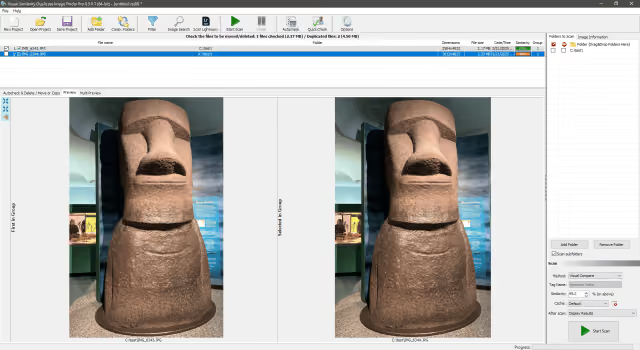
- To integrate the new photos into the collection, use
exiftoolto sort them into date-based folders using EXIF data, if available. Once sorted, manually rename the folders with more descriptive labels.
For example, the following exiftool commands organize .mov and .jpg files found recursively (-r) in the .\original\ and its subfolders into date-based folders (-d FMT) within .\renamed\. The original file’s modification date/time is preserved (-P) during the process.
exiftool -r -P "-Directory<TrackCreateDate" -d ".\renamed\%Y.%m.%d\" -ext MOV ".\original\"
exiftool -r -P "-Directory<DateTimeOriginal" -d ".\renamed\%Y.%m.%d\" -ext JPG ".\original\"
Summary
Photo deduplication is a worthwhile step for anyone looking to manage a digital photo collection efficiently. Removing duplicates saves storage space, enhances organization, and simplifies backups. Whether using manual methods or automated tools, making time for regular deduplication keeps photo memories accessible and enjoyable.
One day this blurry view of New York City will be corrected to reveal something truly mediocre.