Windows 10 End of Support: Forced Obsolescence
The end is coming for Windows 10. On October 14, 2025, Microsoft will officially end support for the operating system that has powered millions of computers for nearly a decade. After that, no more fixes, no new features, and no security updates.
For many people, this change will not matter much. But for me, it marks the beginning of the end for my desktop computer which is the first one I ever built from parts.

If It Still Works, Why Replace It?
I built this computer in 2012. Yes, it is over thirteen years old, and logically, I should accept that it is time to move on. But replacing it feels incredibly wasteful.
I have noticed most people upgrade their computers every three to five years. Sometimes it is because performance slows, sometimes it is because hardware fails, and sometimes simply because it feels like the “normal” cycle. But here I am, a software developer, still using the same machine I built in 2012. More than a decade later, it still has not slowed down enough to bother me.
Part of this is because I am not a hardware enthusiast. My passion has always been software. A computer, for me, is just a tool and not a hobby. If it works, it works. And mine still works. It boots quickly, runs smoothly, and handles everything I throw at it. I do not game and I am not editing blockbuster films, so I have never felt the need to replace it.
But, understandably, Microsoft has decided otherwise. After all, no tech company can continue supporting outdated versions indefinitely.
Forced Obsolescence
When I ran Microsoft’s PC Health Check tool, I received the message:
“This PC does not currently meet Windows 11 system requirements”
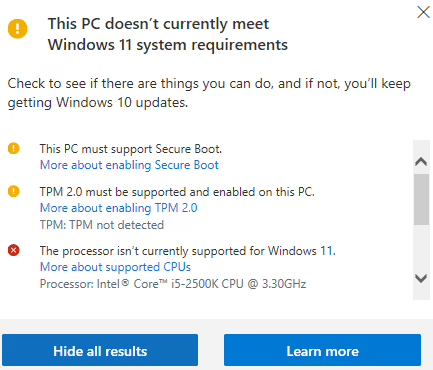
The reason? My 2012-era CPU is not on Microsoft’s approved processor list, and my system does not meet the Secure Boot and TPM 2.0 requirements. From Microsoft’s perspective, my machine is too old to trust. From my perspective, it still does everything I need.
That is the frustrating part. Tech companies love pushing us toward the latest and greatest, but sometimes the “old” stuff works perfectly well. My computer has run Windows 10 like a champ, yet I am now told I must either replace perfectly good hardware or accept the risks of an unsupported system.
It feels like being told a car from 2012, still driving smoothly, is suddenly “unroadworthy” simply because it lacks the newest dashboard gadget.
Windows 11 Ineligibility Options
Since my computer cannot upgrade to Windows 11, I have been receiving (and ignoring) end-of-support reminders for months.
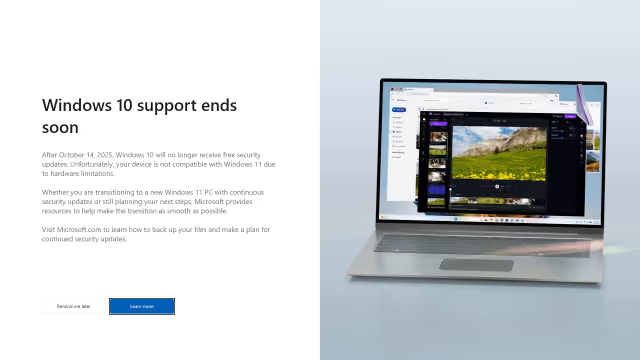
Here are my options:
- Do nothing: Keep using Windows 10 after support ends, while accepting the risks.
- Extended Security Updates (ESU): Pay Microsoft for another year of security patches, until October 2026.
- Install an alternate operating system: Switch to something like Linux to keep the machine alive.
- Bypass requirements: Use hacks to force Windows 11 installation. But if the goal is security, bypassing security checks does not feel like a valid option.
- Buy new hardware: The wasteful option. Replacing a perfectly functional computer just to meet requirements.
The Final Countdown
For now, I am sticking with Do nothing, followed eventually by Buy new hardware when I have no other choice. I built this computer, I trust it, and it has never let me down.
But with the Windows 10 clock ticking, I know it is on limited time. Microsoft is ready to move on, even if I am not.
Until then, my computer may be too old for Windows 11, but for me, it is still just right.