Schedule Monthly Power BI Refreshes Using Power Automate
The standard Power BI scheduled refresh settings do not provide a monthly refresh interval. Power Automate provides a straightforward way to create a monthly schedule without requiring a Fabric-enabled capacity. This article walks through a Power Automate flow that refreshes a Power BI semantic model on the first day of each month.
Instructions
Step 1: Create a New Scheduled Cloud Flow
In Power Automate, select Create and choose Scheduled cloud flow from the Start from blank section.

In the Build a scheduled cloud flow dialog, enter the Flow name, starting date and time, and set Repeat every to every 1 Month. If necessary, configure the recurrence trigger’s time zone so the flow runs at the intended local time.
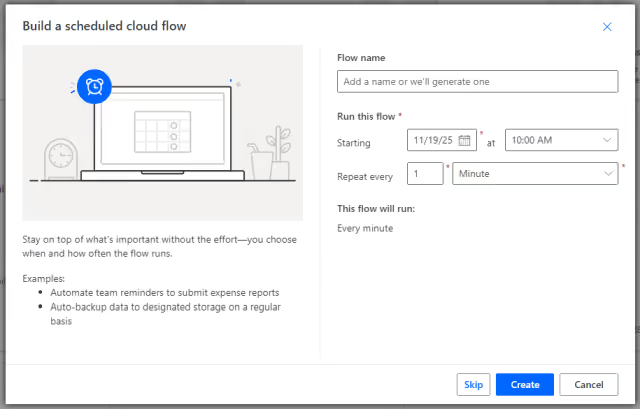
Click the Create button to generate the flow.
The new flow will include a recurrence trigger set to run monthly based on the provided start date and time.
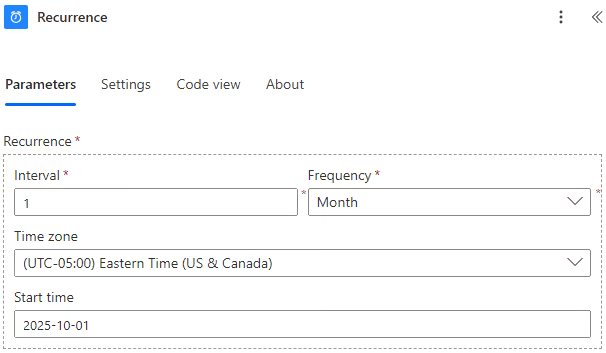
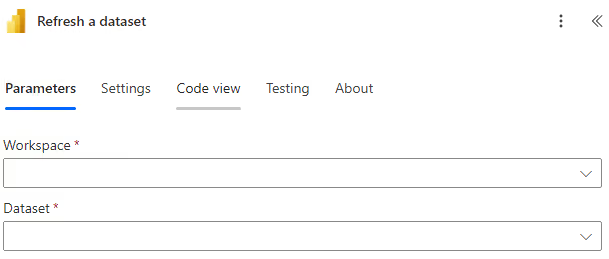
Step 2: Add a Power BI “Refresh a Dataset” Action
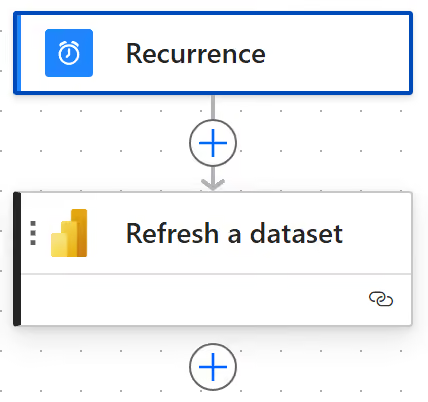
After the recurrence trigger, add a Power BI Refresh a dataset action. Configure it by selecting the correct Power BI Workspace and Dataset.
Click the Save button, then choose Test to manually run the flow. Confirm that the appropriate dataset refreshes as expected.
Results
In this example, the flow was initially scheduled for October 1. It will now automatically run on the first of each following month, refreshing the specified Power BI semantic model.
If a refresh fails, check the semantic model’s refresh history in the Power BI service for details.
Summary
Power Automate adds monthly refresh capabilities to Power BI semantic models, using only a scheduled trigger and a refresh action to automate updates on any monthly schedule. This approach fills a gap in the standard Power BI scheduled refresh settings, which have no monthly refresh interval.